 |
Thank you for choosing Jass for Windows
New customer:
Already purchased PRO and lost your download link:
|
(*) Also check the description of the purchase process
(**) If you think this is too expensive, please download the Free Jass-2.3 Edition.
(***) The product inventory contains aWindows-version as well as a MAC-OSX version. We also provide the scripts in a separate zip-file for your convenience.
Note, that we will refund anybody who is not satisfied with the PRO-edition within 30 days! In that case please contact Gaia Clary in SL (IM)
What is JASS-2 PRO ?
JASS-2 PRO is an enhanced edition of the freely available JASS-2 PUB (Standard Edition). It contains all features of the Standard edition. Below you find the complete list of what you will get with Jass-2 PRO:
Feature list
- Fully functional and complete binary distribution (using an installer)
- embedded blender-2.49b
- embedded python-2.6.5 (MAC-OSX version comes with no python as it is already installed)
- embedded primstar-1.1.0 (separately avilable from the Jass-Shop)
- Grid-Align Tool (Mapping to a unit-cube of 2.55 blender units per dimension no longer required for precision sculpting)
- Additional documentation in the blender Help Menu (Links to the machinimatrix videos)
- Additional blender Theme “Jass Theme”
- Jass Library of Sculpts(ported from Jass-1.4) additional basic sculptie shapes
- Blender now reports its data directory in the console window.
From now on you will never ask again where is my scripts folder!
The following Bonus features are only included in the Jass-2.3 PRO (Premium Edition):
- Enhanced sculptie baker: optimized vertex resolution for multi sculptie bakes (now selectable!)
- Precision fix: No more unexpected vertex jumps after baking.
- Precision fix: No more unexpected Object Center jumps after baking
- SculptifyObjects fix: UV map was wrongly rotated by 90 degrees
- Fix for the “bake sculptie LOD” feature (the baked map can now be used as texture as anticipated)
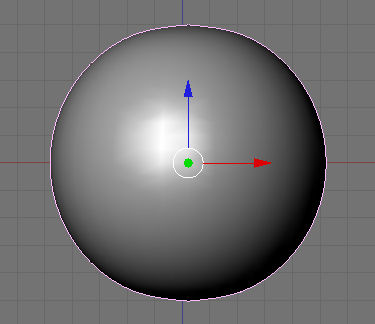
- The primstar-default sphere is now again less a lemon and more a sphere. (Ported from Jass-1.4)
Intended audience:
Everybody who plans to use primstar/blender/Jass-2 frequently.
Everybody who wants to get continued support from the machinimatrix via IM and Email.
Your benefits when purchasing Jass-2.3 PRO Edition
- Individual (limited) support for your questions (via email or IM)
- Free supported updates during a period of one year from date of payment.
- Additional features and enhanced functionality (see below)
- New functionality as it gets ready (e.g. extra tutorials, new features)
Please note:
- We do not sell the software and all content remains under the GPL (Gnu Public License)!
- However purchasing the product from us will give you the insurance that we will help you
to get around your individual problems with installation and usage of the software! - And your payment will help us keeping our future video production and our primstar-support
up and running.
Your rights, your duties
Rights and Duties
In general 3D content that was created with our Tools or made by following our tutorials fully belong to you. And so you can do whatever you like with your content. And you can redistribute your content with any license terms you like. However, some of our products use items from third parties. And these items come along with their own usage terms.
It is your duty to check how the third party TOS policies apply to your work
TOS for third party items
- Linden Lab (The SL avatar mesh, morph data, weight data)
- MakeHuman (mesh data and texture)
- Eloh Eliot (The starlight skin)
Any work based on the above mentioned data has its own license terms. MakeHuman has switched to a commons CC0 license which basically allows you to do what ever you like with your creations. For details please see Explanation of new license terms
For the SL default Avatar please check with Linden Lab. As far as we are concerned the data can be redistributed under a creative Common shareable license. We do not know which license terms apply to any work which is directly based on the SL Default Avatar data.
Re-Distribution of your blendfiles
You can officially redistribute your blend files together with the Avastar Rig. You only need to take care of:
- The Avastar Rig contains the SL avatar using the CC-BY-3.0 license.
- The Starlight skin textures from Eloh Eliot use the MIT License.
- The Avastar-Rig components made by us use the CC-BY-3.0 license.
As far as we know those elements can be redistributed as long as you follow the license policies.
For us it is sufficient when you mention that your blendfile contains the Avastar-Rig using the CC-BY-3.0 license.
For LindenLabs and Eloh Eliot please contact them if you are in doubt.
Re-Distribution of our software
Please refrain from passing on our software products (Avastar, Sparkles, Primstar, …), as we finance the entire product development and maintenance only through sales.
Our Product License Terms
Avastar
Your own creations made with the Help of Avastar can be redistributed in any way you like. This includes commercial usage of the creations and redistribution of .blend files which contain your creations. All parts of the products which are not explicitly marked as GPL are not distributed according to GPL license terms and may not be redistributed.
Sparkles
Your own creations made with the Help of Sparkles can be redistributed in any way you like. This includes commercial usage of the creations and redistribution of .blend files which contain your creations. All parts of the products which are not explicitly marked as GPL are not distributed according to GPL license terms and may not be redistributed.
Primstar-2
Your own creations made with the Help of Primstar-2 can be redistributed in any way you like. This includes commercial usage of the creations and redistribution of .blend files which contain your creations. All parts of the products which are not explicitly marked as GPL are not distributed according to GPL license terms and may not be redistributed.
Primstar-1, Jass-1, Jass-2
The Python scripts in these products are published under GPL license terms. However this does not extend to the Windows installers, data files and other items we provide for your convenience. If you plan to redistribute modified versions of our products, then please take care to strip down the packages to the GPL parts only. The general rule applies:
Your own creations made with Primstar-2 can be redistributed in any way you like. This includes commercial usage of the creations and redistribution of .blend files which contain your creations. All parts of the products which are not explicitly marked as GPL are not distributed according to GPL license terms and may not be redistributed.
In particular you are not allowed to redistribute:
- The Jass-installers executables themself
- the blenderloader.exe
- data files such as the library sculpt maps (*.png) and Blend files (*.blend) (except avatar.blend)
For more detailed information please examine the installed software in detail and check the readme files.
The enhanced features
Enhanced baker for Multi sculptie bakes
The Primstar-baker is capable to bake multiple sculpties within one single bake. It then can ensure that the vertex locations of the different sculpties are placed on the same global grid, thus you can precisely align 2 or more sculpties along their seams . The baker works great for more or less equal sized sculpties (having comparable bounding boxes). But the bigger the difference in size is, the more will the smaller parts be degraded. technically the smallest parts get degraded to tiny little spheres when their size is about 100 times smaller than the size of the biggest part!
Our optimisation ensures that the maximum loss of spatial resolution is 50% regardless of the difference in size of the parts!. The degradation is no longer linear, so that you can bake very small and very large objects together without loosing much of detail. The maximum loss of precision happens for parts which are slightly bigger than half the size of the biggest part. Only in that case the resolution degrades by 50%.
Note that our enhancements always(!) beats the original baker in precision. But there is one caveat: Our baker will not allow parts to become smaller than 0.5 cm in linden units. So if you need to work with tiny sculpts, then you will have to disable the spatial optimization. You can see an example in action in our sculpted prims III tutorial: The left hat is created with the default baker, while the right hat is created with the enhanced baker in Jass-2. You see the small sculpties degrade on the left side, while on the right there is almost no visible degradation:
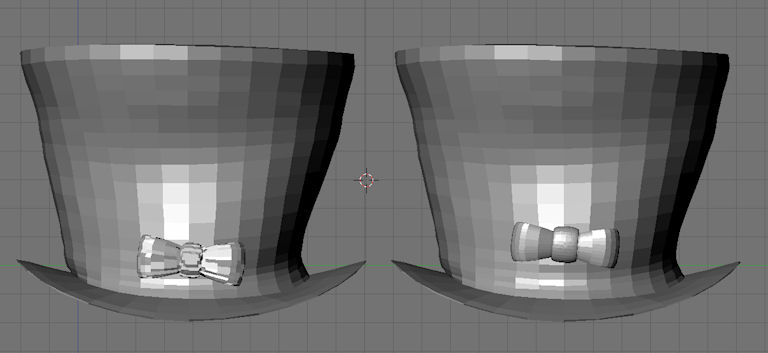
Starting from Jass-2.3 we have added an additional checkmark (named “optimize Resolution”) right into the baker tool:
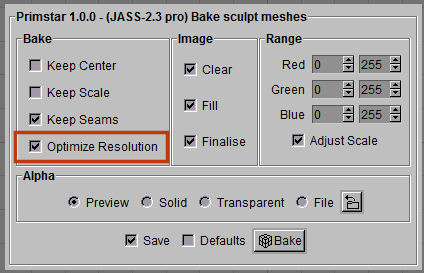
The new “Optimze Resolution” checkmark only appears when you bake multi part sculpties.
- If the checkmark is checked (default), then the baker behaves as described above. The downside is that parts can not be smaller than 0.5 cm in each dimension.
- If the checkmark is disabled, then the old primstar behaviour is performed. The downside is that the parts quality degrades linear with size (the smaller the part, the more degradation occurs)
Precision fix for vertex jumps after baking.
When you work with oblongs you often see some more or less unexplainable vertex shifts in the baked sculptie. Sometimes you even can see that collapsed vertices (two or more vertices at the same location) will be partially displaced after baking and introducing undesired inprecisions on the sculptie surface. This can lead to serious degradations in the quality of the end product.
We have fixed this issue in Jass-2.3 (More detailed infos will be published here soon).
Sculptify Objects fix for wrong UV map calculation
SculptifyObjects allows to convert “suitable objects” to sculptmaps. Suitable objects are all objects which can be fully mapped to one of the basic sculptmap types, namely plane, sphere, cylinder or torus. SculptifyObjects works on meshes as well as on NURBS. While it always creates reasonable results for NURBS, it fails to create correct results for meshes when you do the following:
- create a sculptie using the add sculptmesh tool
- remove its UV-map ( the one named “sculptie”)
- apply Object -> Scripts -> Sculptify Objects
Now you get a new UV map but it is rotated by 90 degrees. The main reason why this behaviour occurs is that the SculptifyObject was originally made for NURBS. And with NURBS we need to rotate the sculptmap by 90 degrees. this rotation is not needed with mesh obects. primstar does not take care of that. Starting from Jass-2.3 this bug has been fixed.
Default Sphere is no longer distorted (lemon shaped)
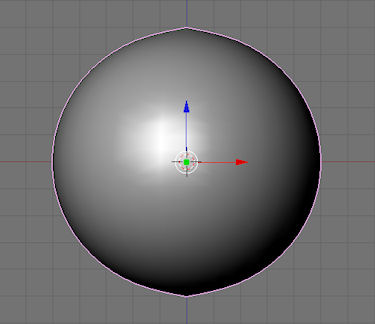
primstar is capable to use subsurf modifier and multires with sculpted prims. In both cases blender calculates the final mesh based on a smaller set of “control points”. One property of the algorythm is that it does not keep the initial object shape. Hence for spheres the default gets slightly distorted to a lemon like form (left image). On the right image you see the corrected shape created by Jass-2:
sculptmaps can now be reused as textures
One hidden problem in primstar can be found with the sculptmap baking. If you wanted to use a sculptmap as object texture right after baking, this will not work with primstar, because primstar unintentionally has locked an internal blender state. If you select the baked image then go to textured mode, nothing happens until you try to change the texture e.g. with a paint tool. Then suddenly the whole image gets rendered as texture. We found this behaviour annoying and corected it in Jass-2. One possible use case is when you just have baked the sculptie-LOD (script in the image editor) in order to see, which vertex belongs to which LOD. In Jass-2 this works as expected.
Grid Align Tool (now also included in Jass-pub)
The GridAlign Tool simulates the spatial resolution of OpenSim (or you preferred compatible online world). You can select any set of vertices, then pressing ALT-g on the keyboard will move the selected vertices to the nearest valid locations on the virtual grid. The tool is fully described in the GridAlign documentation. Note that you of course can use blender’s embedded grid if you rescale your object to a unit cube (cubic Bounding box). But then you will have to rescale your model. With the GridAlign tool you can align precisely without rescaling! (“inplace alignement”)
More Bugfixes and enhancements (only in JASS-PRO)
- FIX: Object Center sometimes jumps away from geometrical center during bake
- FIX: Objects sometimes jumps away from its original position during bake
- FIX: Multipart baker sometimes creates LSL-file with wrong object scale
- FIX: Sculptify Object creates UV-map with a rotation of 90 degrees when applied to sculpties
- NEW: “Optimize Resolution” OPTION for multi-part bakes.
Detailed descriptions
09-sep-2010 FIX: Object Center sometimes jumps away from geometrical center during bake
When an object was scaled in object mode, the calculation of the object center was done wrong. So it could happen that an object center jumps way out of focus and potentially causes very odd behaviour after baking. This problem has been fully solved and object centers should now be placed at the correct location in any situation.
09-sep-2010 FIX: Objects sometimes jups away from its original position during bake
Occasionally an object jumps to a different location directly after bake. Usually you can get the object back to its original location by hitting CTRL-z. We think we found the cause and fixed it.
09-sep-2010 FIX: Multipart baker sometimes creates LSL-file with wrong object scale
The symptom is that the LSL-script generates all parts of the object in nearly the same size regardless of their actual size. The problem was caused by the “optimized resolution” feature. This feature actually uses different BoundingBoxes for the parts of the set, while the original algorithm used the same BoundingBox for all parts and adjuted the size of the parts by reducing the number of available grid points.
FIX: Sculptify Object creates UV-map with a rotation of 90 degrees when applied to sculpties
You can create an UV-map for “sculptie compliant meshes” aka meshes which can be “sculptified” without modifying the mesh itself. The function can be applied in object mode and from there:
Object -> scripts -> Sculptify Objects
This function works only if it is applied to a mesh which was NOT previously created with Add -> mesh -> sculpt mesh. When it is applied to a sculptie, then the resulting UV-map is rotated by90 degrees. In JASS-PRO this problem has been solved and thus the workflow is slightly easier:
for original Primstar:
- go to object mode
- select object
- if object has a sculptmap (UVTex named “sculptie”), then delete that map.
- object -> scripts -> Sculptify Objects
- if the object was already a sculptie, then the map is rotated by 90 degrees
and must be rotated back in the UV-editor
for jass-pro:
- go to object mode
- select the object
- object -> scripts -> Sculptify Objects
Jass-pro auto detects if the object was a sculptie or not and corrects
the UV-rotation issue on the fly
NEW: “Optimize Resolution” now always visible but disabled for single part bakes
The “Optimize Resolution” feature is only usefull in multi part bakes. In 2.3.2 the function has been hidden from the GUI for single sculptie bakes. This caused a bit of confusion. Hence i have changed the GUI such that now the option always displays but is disabled for single sculptie bakes.
Enjoy Jass-Pro,
The Machinimatrix